
User Tools
软件:linux:gcloud_cli
Table of Contents
gcloud CLI
GCP的命令行工具
安装
不推荐使用 brew 安装
# 安装命令
brew install --cask google-cloud-sdk

# 安装的时候会出错
==> Linking Binary 'gcloud' to '/opt/homebrew/bin/gcloud'
==> Linking Binary 'git-credential-gcloud.sh' to '/opt/homebrew/bin/git-credential-gcloud'
deleting existing virtual env before enabling virtual env with current Python version
Creating virtualenv...
ERROR: (gcloud.config.virtualenv.create) /opt/homebrew/opt/python@3.12/libexec/bin/python3: command not found
==> Unlinking Binary '/opt/homebrew/bin/git-credential-gcloud'
...

# 这是因为安装的过程中,需要使用到 python3.12
# 并且要求这个 python3.12 必须是使用 brew 安装的,这个管的就有点多了
# 这不是 gcloud 的要求,是 brew 的要求(尽可能不依赖外部包)

# 遇到这个错误,brew 应该会自动清理回滚的
# 不放心可以这样检查一下
anny@annys-Air ~ % brew list --cask gcloud-cli
Error: Cask 'gcloud-cli' is not installed.
anny@annys-Air ~ % which gcloud
gcloud not found
使用官方的安装包
# google-cloud-cli-darwin-arm.tar.gz
# https://cloud.google.com/sdk/docs/install-sdk?hl=zh-cn

anny@annys-Air Downloads % tar -xf ./google-cloud-cli-darwin-arm.tar.gz
anny@annys-Air Downloads % ./google-cloud-sdk/install.sh
Welcome to the Google Cloud CLI!
...
Your current Google Cloud CLI version is: 539.0.0
The latest available version is: 539.0.0

┌─────────────────────────────────────────────────────────────────────────────────────────────────────────────────┐
│                                                    Components                                                   │
├───────────────┬──────────────────────────────────────────────────────┬──────────────────────────────┬───────────┤
│     Status    │                         Name                         │              ID              │    Size   │
├───────────────┼──────────────────────────────────────────────────────┼──────────────────────────────┼───────────┤
│ Not Installed │ App Engine Go Extensions                             │ app-engine-go                │   4.5 MiB │
...
│ Installed     │ Google Cloud CLI Core Libraries                      │ core                         │  22.5 MiB │
│ Installed     │ Google Cloud CRC32C Hash Tool                        │ gcloud-crc32c                │   1.4 MiB │
└───────────────┴──────────────────────────────────────────────────────┴──────────────────────────────┴───────────┘
To install or remove components at your current Google Cloud CLI version [539.0.0], run:
  $ gcloud components install COMPONENT_ID
  $ gcloud components remove COMPONENT_ID

To update your Google Cloud CLI installation to the latest version [539.0.0], run:
  $ gcloud components update


Modify profile to update your $PATH and enable shell command completion?

Do you want to continue (Y/n)?  y

The Google Cloud SDK installer will now prompt you to update an rc file to bring the Google Cloud CLIs into your
environment.

Enter a path to an rc file to update, or leave blank to use [/Users/anny/.zshrc]:
Backing up [/Users/anny/.zshrc] to [/Users/anny/.zshrc.backup].
[/Users/anny/.zshrc] has been updated.

==> Start a new shell for the changes to take effect.


Google Cloud CLI works best with Python 3.12 and certain modules.

Download and run Python 3.12 installer? (Y/n)?  y

Running Python 3.12 installer, you may be prompted for sudo password...
/Library/Developer/CommandLineTools
Xcode Command Line Tools is already installed.
Password:
installer: Package name is Python
installer: Upgrading at base path /
installer: The upgrade was successful.
Setting up virtual environment
Creating virtualenv...
Installing modules...
     ━━━━━━━━━━━━━━━━━━━━━━━━━━━━━━━━━━━━━━━━ 5.6/5.6 MB 2.3 MB/s eta 0:00:00
Virtual env enabled.

For more information on how to get started, please visit:
  https://cloud.google.com/sdk/docs/quickstarts

# 虽然我的系统里已经安装了 python3.12
# 但是在安装 gcloud 的过程中还是选择了[Download and run Python 3.12 installer]

# 开启新窗口,让 rc 文件生效
anny@annys-Air ~ % gcloud --version
Google Cloud SDK 539.0.0
bq 2.1.23
core 2025.09.12
gcloud-crc32c 1.0.0
gsutil 5.35

# 初始化,可以选择暂时不登录
anny@annys-Air ~ % gcloud init
Welcome! This command will take you through the configuration of gcloud.

Your current configuration has been set to: [default]

You can skip diagnostics next time by using the following flag:
  gcloud init --skip-diagnostics

Network diagnostic detects and fixes local network connection issues.
Checking network connection...done.
Reachability Check passed.
Network diagnostic passed (1/1 checks passed).

You must sign in to continue. Would you like to sign in (Y/n)?  n

The Google Cloud CLI is configured and ready to use!

* Commands that require authentication will fail until you are authenticated
Run `gcloud help config` to learn how to change individual settings

This gcloud configuration is called [default]. You can create additional configurations if you work with multiple accounts and/or projects.
Run `gcloud topic configurations` to learn more.

Some things to try next:

* Run `gcloud --help` to see the Cloud Platform services you can interact with. And run `gcloud help COMMAND` to get help on any gcloud command.
* Run `gcloud topic --help` to learn about advanced features of the CLI like arg files and output formatting
* Run `gcloud cheat-sheet` to see a roster of go-to `gcloud` commands.

# 登录 Google 账号
anny@annys-Air ~ % gcloud auth login
Your browser has been opened to visit:
...
和认证相关的基础知识
- 用户凭证(User credentials):简单理解为一个GCP账户,对应一个「自然人」。
- 服务账号(Service Account, SA)凭证:简单理解为一个Token,是一个权限集合(权限通过给这个 SA 绑定 IAM 角色 来授予),对应「机器人」等(非自然人)。
- 只要你已经用“人类账号”在某处完成了服务账号的创建、授权、并把密钥(JSON)安全拿到手,那么在另一台电脑上:
- 不用再登录个人 Google 账号;
- 只需要这份 服务账号密钥文件 就能访问对应的 GCP 资源(前提是该 SA 已有足够的 IAM 权限、相关 API 已启用、项目已开通结算)。
- IAM:身份与访问管理(Identity and Access Management)
- ADC:应用默认凭证(Application Default Credentials)
ADC
为了在本地环境能访问到GCP,我们需要设置ADC。
如何理解ADC?
AI:应用默认凭证(Application Default Credentials,简称 ADC)是 Google Cloud 提供的一种自动发现并获取凭证的机制。其目标是:让你在本地开发、测试或在云上运行时,用同一套代码就能拿到可用的身份来调用 Google Cloud API(Storage、Pub/Sub、BigQuery 等),而不用在代码里硬编码密钥路径。(ADC = 自动找可用身份 的通用入口。代码不变,环境不同也能顺利拿到凭证。)
ADC的认证密钥查找顺序:
- 环境变量,如果设置了 GOOGLE_APPLICATION_CREDENTIALS=/path/to/key.json,就读取这个 JSON(通常是服务账号密钥)。
- 本机的应用默认登录,本地开发机上运行过[gcloud auth application-default login]会把用户凭证写到本地(通常在 ~/.config/gcloud/application_default_credentials.json),ADC 会用它。
ADC的使用效果:
from google.cloud import storage

client = storage.Client()  # 触发 ADC
for b in client.list_buckets(project="my-project"):
    print(b.name)
在本地开发时,ADC可以使用两种身份认证,用户凭证和SA凭证都可以:
- 用用户账号:gcloud auth application-default login(方便,但权限往往较大)
- 用服务账号:设置 GOOGLE_APPLICATION_CREDENTIALS 指向服务账号密钥(更接近生产身份)
GCP的认证(个人GCP账户)
用户账号(这里不推荐,暂时不详细写)
gcloud auth login # 这一句需要吗?
gcloud auth application-default login
gcloud auth application-default print-access-token
服务账号SA
# 首先认证 Google 账号
anny@annys-Air ~ % gcloud auth login
Your browser has been opened to visit:
...

You are now logged in as [xxx].
Your current project is [None].  You can change this setting by running:
  $ gcloud config set project PROJECT_ID

# 查看账号列表
anny@annys-Air ~ % gcloud auth list
   Credentialed Accounts
ACTIVE  ACCOUNT
*       xxx

To set the active account, run:
    $ gcloud config set account `ACCOUNT`

# 退出账号(暂未验证)
gcloud auth revoke

# 查看项目列表
anny@annys-Air ~ % gcloud projects list
PROJECT_ID                  NAME        PROJECT_NUMBER
id...                       n1          000...
id...                       n2          111...

# 设置当前项目
anny@annys-Air ~ % gcloud config set project <id>
Updated property [core/project].

# 启用API(在网页端启用后,应该不需要这句命令吧)
gcloud services enable bigquery.googleapis.com pubsub.googleapis.com

# 创建SA(记得先设定好 Project)
# 服务账号(SA)属于某个项目里创建的资源(邮箱里会带项目 ID)
# 但它可以被授予其他项目/文件夹/组织上的权限,所以也能跨项目访问被授权的资源
anny@annys-Air ~ % gcloud iam service-accounts create study-sa-01 --display-name="Study SA 01"
Created service account [study-sa-01].

# 查看SA列表
anny@annys-Air ~ % gcloud iam service-accounts list --project=xxx
DISPLAY NAME  EMAIL                                             DISABLED
Study SA 01   study-sa-01@xxx.iam.gserviceaccount.com           False

# 查看一个SA的详细信息
anny@annys-Air ~ % gcloud iam service-accounts describe study-sa-01@xxx.iam.gserviceaccount.com
displayName: Study SA 01
email: study-sa-01@xxx.iam.gserviceaccount.com
etag: ...
name: projects/<...>.iam.gserviceaccount.com
oauth2ClientId: '...'
projectId: xxx
uniqueId: '...'

# 分配权限
anny@annys-Air ~ % gcloud projects add-iam-policy-binding xxx \
  --member="serviceAccount:study-sa-01@xxx.iam.gserviceaccount.com" \
  --role="roles/bigquery.user"
Updated IAM policy for project [xxx].
...

# 同理
gcloud projects add-iam-policy-binding xxx \
  --member="serviceAccount:study-sa-01@xxx.iam.gserviceaccount.com" \
  --role="roles/pubsub.publisher"
# 同理
gcloud projects add-iam-policy-binding xxx \
  --member="serviceAccount:study-sa-01@xxx.iam.gserviceaccount.com" \
  --role="roles/pubsub.subscriber"

# 进入 GCP 的 WebUI > 控制台 > IAM和管理 > IAM,即可查看当前的SA

# 创建并下载密钥(json)
anny@annys-Air ~ % gcloud iam service-accounts keys create /Users/anny/Desktop/study-sa-01.json \
  --iam-account=study-sa-01@xxx.iam.gserviceaccount.com
created key [...] of type [json] as [/Users/anny/Desktop/study-sa-01.json] for [study-sa-01@xxx.iam.gserviceaccount.com]

# 记得修改权限
chmod 600 study-sa-01.json

# 有了此密钥之后,在其他电脑上就不用再登录 Google 账号了

# 让 gcloud 使用此密钥
# gcloud 有一些命令可以直接和 GCP (BigQuery / PubSub...) 交互,调试的时候可能有用
anny@annys-Air ~ % gcloud auth activate-service-account \
  --key-file=/Users/anny/Desktop/study-sa-01.json \
  --project=xxx
Activated service account credentials for: [study-sa-01@xxx.iam.gserviceaccount.com]

# 再次确认认证列表,用户应该已经切换了
anny@annys-Air ~ % gcloud auth list
                 Credentialed Accounts
ACTIVE  ACCOUNT
        <email>
*       study-sa-01@xxx.iam.gserviceaccount.com

To set the active account, run:
    $ gcloud config set account `ACCOUNT`

# 让代码使用这个SA(自动使用,因为是ADC)
# 注意,这一步很重要
export GOOGLE_APPLICATION_CREDENTIALS=/Users/anny/Desktop/study-sa-01.json
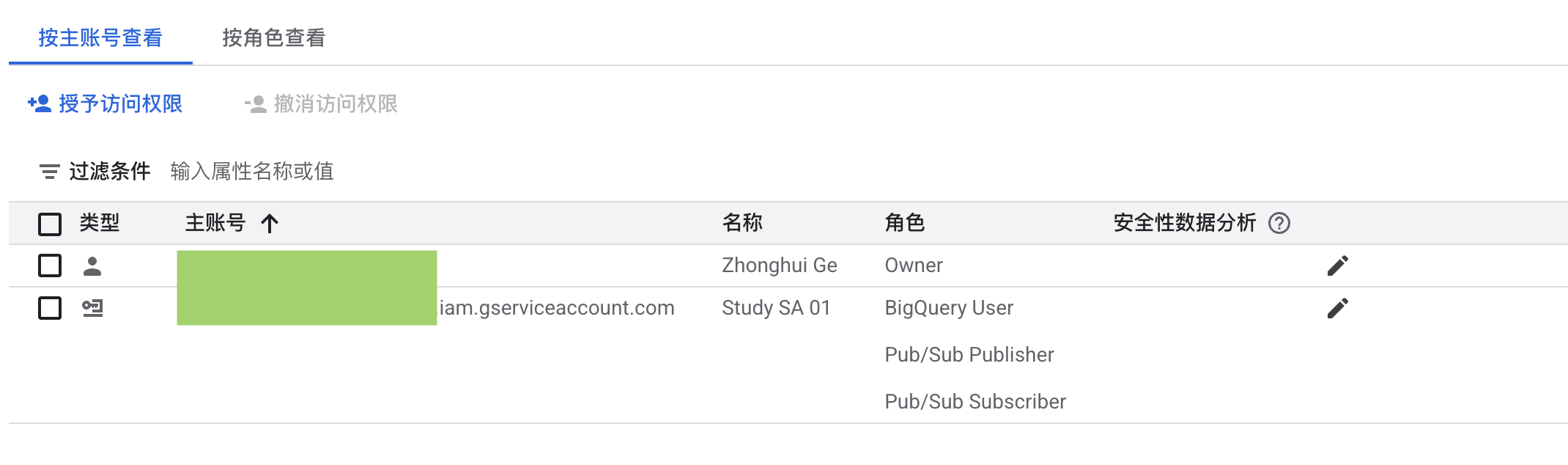
ps:创建SA和分配权限的流程,好像在网页端也可以完成
GCP的认证(公司GCP账户)
每个公司可能都有些许不同之处
参考资料
- 安装 Google Cloud CLI https://cloud.google.com/sdk/docs/install-sdk?hl=zh-cn
- Google 的身份验证方法 https://cloud.google.com/docs/authentication?hl=zh-cn
- 使用 gcloud CLI 时进行身份验证 https://cloud.google.com/docs/authentication/gcloud?hl=zh-cn
/var/www/DokuWikiStick/dokuwiki/data/pages/软件/linux/gcloud_cli.txt · Last modified: 2025/09/22 01:28 by zhonghui
Page Tools
Except where otherwise noted, content on this wiki is licensed under the following license: GNU Free Documentation License 1.3


